


Making Copies of Corp BPC's Correctly
Step 1 Choose your BPO you want to Copy from the Corp BPO Folder By Double Clicking the BPO
To change the appearance of the page, edit the styles of the corresponding elements (in most cases by using the "Main Frame" Style Zone).
To change the menu’s links: edit, copy-paste, or delete the Link Elements within.
To hide an element without deleting it, use its property Visible.
To change the menu’s links: edit, copy-paste, or delete the Link Elements within.
To hide an element without deleting it, use its property Visible.

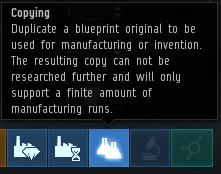
Step 2. In Industry Tab in the Middle click on the icon as shown below.

Step 3. Now Make sure on the Right Side that you have chosen the Output Location and your personal Wallet As shown Below.
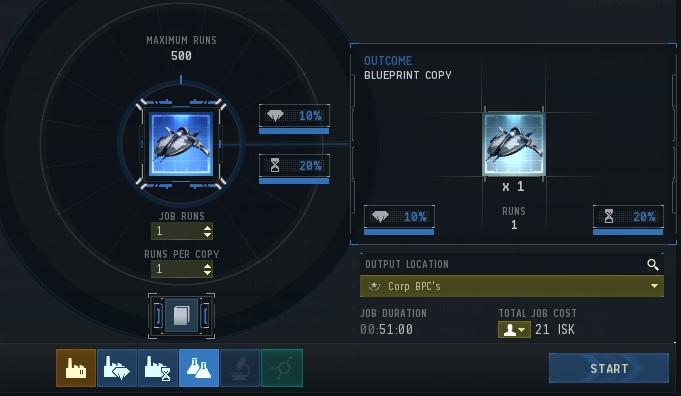
Make Sure the Output Location is
Set to Corp BPC's Unless its an Capital BPO that you are copying then Change it to Corp Capital BPC's
Make Sure that your Wallet is set to Personal and Not Corp Craft.
Set to Corp BPC's Unless its an Capital BPO that you are copying then Change it to Corp Capital BPC's
Make Sure that your Wallet is set to Personal and Not Corp Craft.
To "activate" displaying of an arrow, use its property "Visible"